Documents, sheets and slides
Open and edit Word, Excel and PowerPoint files, plus OpenDocument. Start a new one in a tap. Save as PDF from the editor.
DOCXXLSXPPTXRTFCSV
For Android · iPhone and iPad next
Doknilo edits documents, sheets and slides, signs and stamps PDFs, and scans paper. No account. Works without internet. Your files never leave your phone.
Android first. Want to know the day it lands? Email us and we'll tell you. iPhone and iPad: in preparation.
What it does
One app for the files you get every day. Nothing to sign up for, nothing to upload.
Open and edit Word, Excel and PowerPoint files, plus OpenDocument. Start a new one in a tap. Save as PDF from the editor.
Draw, type or add initials. Design a stamp or make one from a photo, then move and resize it exactly where it belongs.
Turn paper into a clean PDF with your camera, or combine photos into one file.
Read, search, highlight, draw and fill forms. Pro adds merge, split, reorder, protect and compress.
Invoices, quotations, CVs and letters in English, Arabic and Turkish. Five are free; Pro opens all 27.
Arabic and other right-to-left text is laid out correctly, in the app and in your documents.
See it work
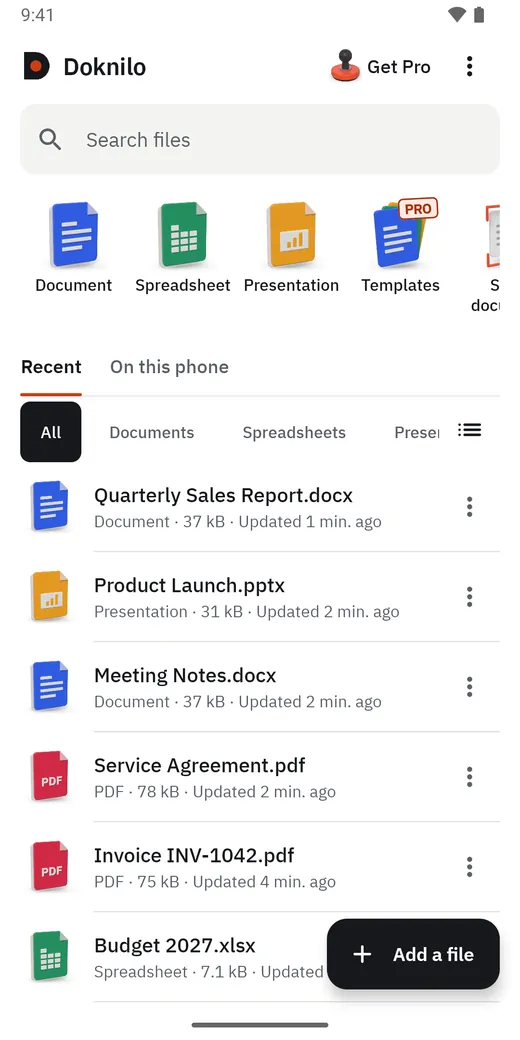
These are screenshots from the Android build, with made-up files and names.
Private by design
Doknilo has no accounts and no cloud. What you open, edit, sign and scan stays on the device.
Free editing without an account. Open the app and start working.
Your documents are never sent to us. Not for processing, not for backup, not for ads.
You work on a copy, with recovery points. A crash or a mistake does not cost you your file.
The free version shows one small banner in the file list, never inside a document. Ad providers may use your advertising ID and approximate location; where the law requires it we ask first. Read the full privacy policy.
Free and Pro
Edit, read and sign for free. Go Pro when you need the heavy PDF work.
| What you get | Free | Pro |
|---|---|---|
| Open, edit and save documents | ✓ Yes | ✓ Yes |
| Read, highlight, draw, fill forms and sign | ✓ Yes | ✓ Yes |
| Pages per scan | 10 | 50 |
| Photos per PDF | 10 | 100 |
| Business templates | 5 | 27 |
| PDF tools and converting | 3 tries each | Unlimited |
| Ads | One small banner | None |
Questions
On your phone, in the app's library. Your original file only changes if you choose Save to original file. Use Export a copy or Share to send an edited file elsewhere.
Open the PDF and tap Sign. Draw, type or add initials, then move and resize the signature on the page. Stamps work the same way: design one or make it from a photo, and keep it in Settings.
Only to list and open the documents on your phone. Nothing is sent anywhere.
Open Doknilo and tap Recover unsaved changes on the home screen. Recovery points are kept on your device.
On Android: Google Play, then Profile, then Payments and subscriptions. On iPhone: Settings, your name, Subscriptions.
Sign in to the same Google Play or Apple account, open Settings, tap Upgrade to Pro, then Restore purchases.
In Settings, choose Export all documents, then copy the result to the new phone.
Yes. Arabic and other right-to-left text is laid out correctly, and the app speaks English, Arabic and Turkish.
It is in preparation. The first version will open Word, Excel and PowerPoint files to read, and handle PDFs.
Free to start. No account. Your files stay yours.
Android first. Want to know the day it lands? Email us and we'll tell you. iPhone and iPad: in preparation.